
 Claude
 Gaia
GaiaRecursive Rendering
React 16 introduced the new reconciliation algorithm. The old reconciliation algorithm used to render everything recursively, meaning once the rendering process starts, there is no way for us to stop it unless it finishes the work itself. This led to some issues.
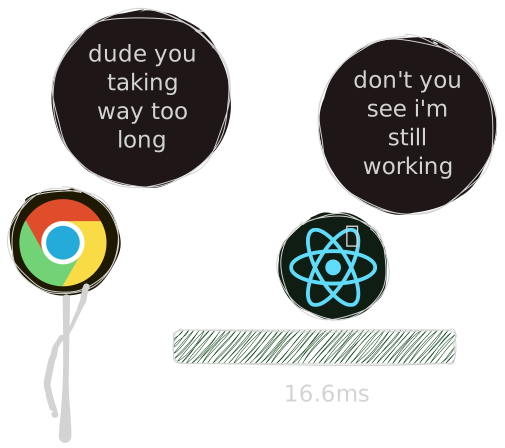
Say your browser is working at 60fps, which is 60 frames per second, 1 frame in 16.6ms. Your browser
has to render 1 frame in 16ms. During this one rendering process, it needs to reflow, repaint, etc.
If your JavaScript itself takes more than 16ms, it doesn't give time for the browser to do the work. It would drop the
frame, which would lead to janky UI.
You can watch the full video here
Intended audience
This post takes a deep, technical dive into the internals of React Fiber. If you're wondering why React Fiber was created in the first place, I recommend reading my previous post first: Understanding Why React Fiber Exists
New Reconciliation algorithm
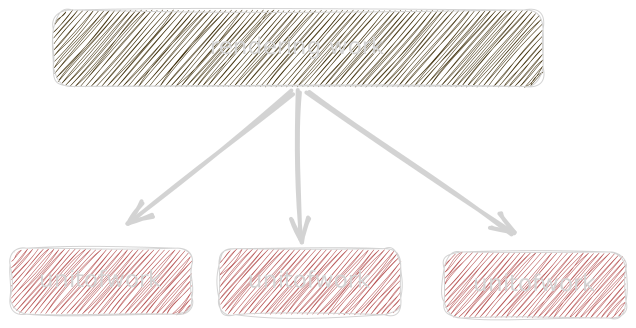
So with this new reconciliation algorithm, React breaks the rendering process into small units of work. Rather than doing all rendering at once, we perform rendering in small units of work within a time slice.
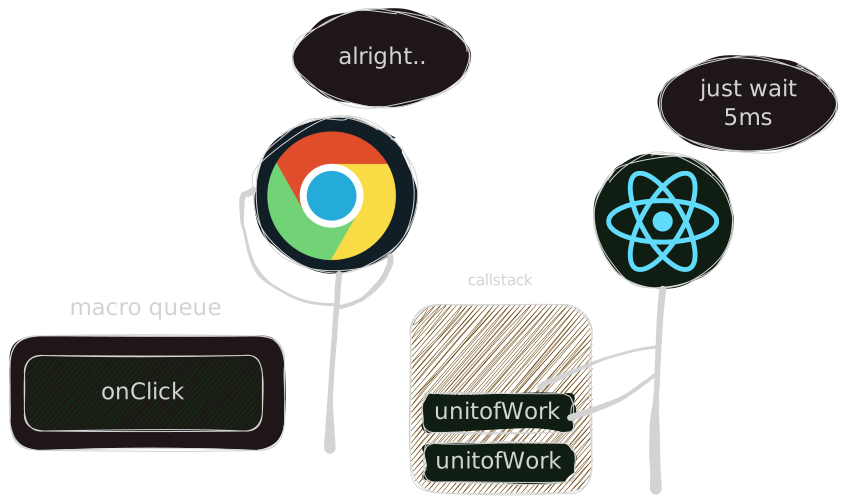
React is just like "I will do the work I can in this time frame (~5ms) and will let the browser do its work " Once the browser finishes its work, it will again let React know I'm done with my work, you can continue now. Now React will resume its rendering work from where it had left off.
Fibers
When you write JSX, you are describing how your UI should look. JSX is just syntactic sugar for React.createElement. A compiler like Babel transforms JSX into JavaScript function calls, which at runtime produce React elements. During the reconciliation process, React takes these React elements and incrementally creates Fiber nodes from them.
const fiber = {type: "form",key: null,// tree structurechild: null,sibling: null,return: null,// state & updatesmemoizedState: null,lanes: 0,childLanes: 0,// side effectsflags: 0,// alternate for diffing (current <-> workInProgress)alternate: null};
- See those three properties of fiber object?
child,sibling,return. These are pointers. They connect fibers to other fibers, forming a linked list.
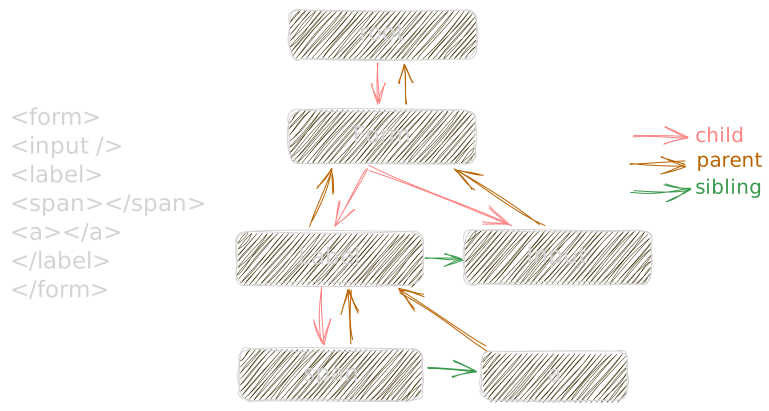
Fiber is nothing but a JavaScript object that is an in-memory representation of how your UI looks. During the initial mount of the components, React will build this fiber tree from the React elements. React's reconciliation algorithm only cares about the React fiber—it has no clue of the DOM at all. This platform-agnostic data structure allows React to be used on other platforms as well, like building UIs for mobile apps, 3D apps, and terminal apps.
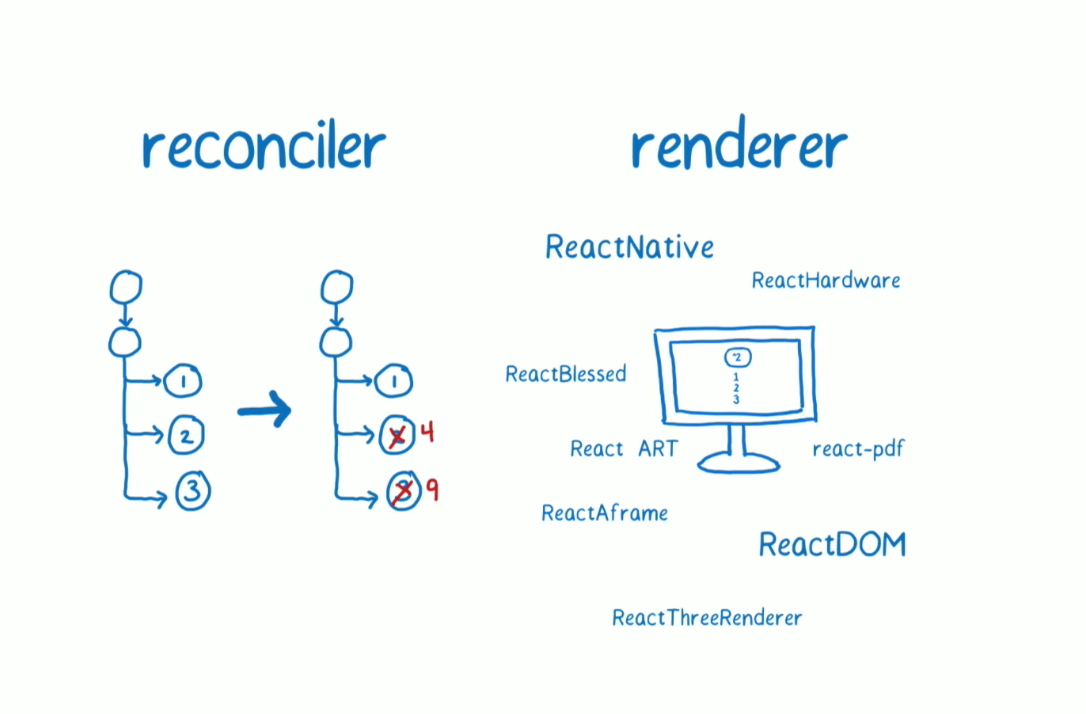
Data Structure or Algorithm?
React fiber is both the data structure and a codename for a new reconciliation algorithm
Four Phases: Trigger, Schedule, Render and Commit
The core point of the React fiber architecture is to enable breaking down a big rendering process into small units of work. The main advantage is that we don't block the browser from executing any task in the callstack.
Let's see how things exactly work.
import { useState } from "react";
import "./styles.css";

export default function App() {
return (
  <div className="wrapper">
    <h1>Counter</h1>
    <Counter />
  </div>
);
}

function Counter() {
const [count, setCount] = useState(0);

return (
  <div className="counter">
    <p>{count}</p>
    <button onClick={() => setCount(count + 1)}>Increment</button>
  </div>
);
}
Trigger
Say React is rendering a product list by fetching an API, and in the middle, you clicked an increment button. Your click event is enqueued into the macro queue
in the browser.
React works in time slices, constantly checking if it has time to process more units of work. Once it notices that its current 5ms slice is up, it yields control back to the browser. The browser then takes your onClick callback from the queue and runs it.
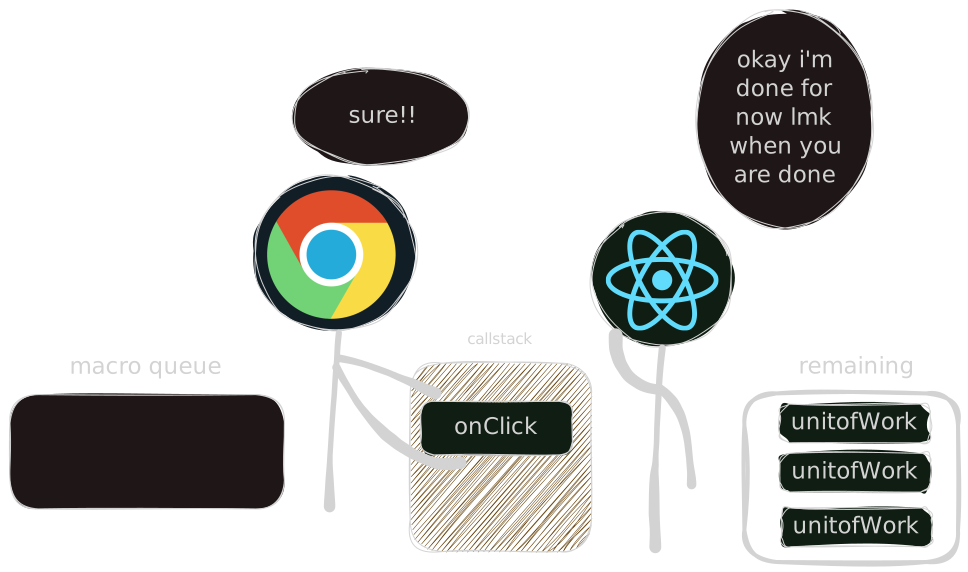
inside that callback is the setCount function. Internally, setCount is just a state dispatcher it tells React, this fiber has new work that needs to be scheduled.
Schedule
Now the task is to schedule a new render. You might be wondering why start a new render when the previous one has not even finished
The reason is that React can pause ongoing work if a higher priority update comes in. When you click that button and call setCount, React needs to figure out how urgent this new update is compared to what it is already doing. That is where lanes come in
Look above in this blog to see the fiber properties. There are two properties: lanes and childLanes. You can think of a lane as the priority assigned to an update
- lanes: tracks the priority of work this fiber itself
- childLanes: keeps track of any pending work in its subtree
Lanes in React are a 32-bit integer-based priority system introduced to manage concurrent rendering, acting as "virtual highways" that categorize the urgency of updates
Note
React uses a 32-bit integer to represent lanes, which allows multiple lanes (priorities) to be merged together efficiently. For example:
const SyncLane = 1;const TransitionLanes = 2;// Merge lanes using bitwise ORconst lane = SyncLane | TransitionLanes;
Later, you can quickly check if a lane includes a particular priority:
if (lane & SyncLane) {// This update includes a sync lane}
Since this is a button click and it has the highest priority, we mark the lane on the Counter fiber. Now the Counter fiber knows it has work to do. But React does not start rendering from here. It always begins from the root fiber. That is why we propagate this lane upward, merging it into the childLanes of each parent along the way until it reaches the root.
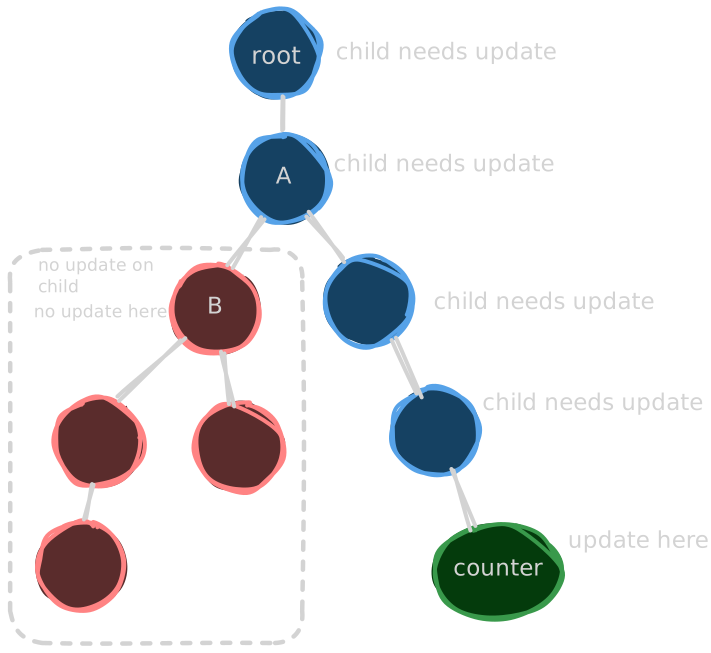
Propagating the lane is important because during rendering, React starts at the root and walks the tree. At each fiber, it checks lanes and childLanes to decide whether there is work to do. In our diagram, the B node has no lanes and no childLanes. React can immediately skip the entire B subtree without going deeper. By propagating the lanes, React can make these decisions quickly and avoid unnecessary work.
Coming back to our original counter example, this is how it looks like
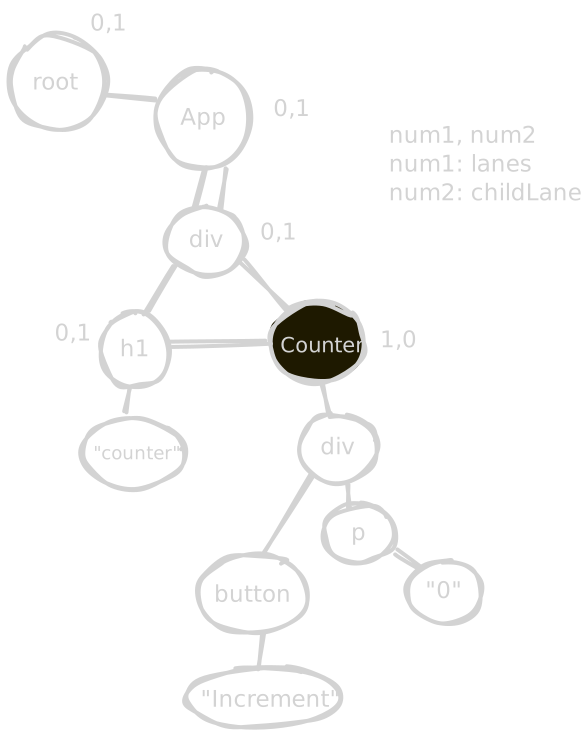
Note
Don't get confused by numbers, react has a different lanes like SyncLane, DefaultLane, OffscreenLane
and they are just a variable of 32 bit integer but for the simplicity I'm keeping 1,0
Now that we have marked the lanes and childLanes, we can schedule a new render. We just set the priority for our update, and React knows it has work to do. The scheduler looks at all pending updates and compares their priorities.
If a higher priority update comes in while a lower priority task, like fetching data from an API, is still running, React can pause that lower priority work and start rendering the high priority update. It does not throw away the paused work once the high priority work is finished, React can resume the previous task.
You might wonder what happens if high priority updates keep coming. Does that mean low priority updates will never get rendered? React handles this smartly. Each update has a expiration time, which is the maximum time it can be delayed. If a low priority update reaches its expiration time, React will merge it with higher priority lane so it doesn't starve forever. This ensures that all updates eventually get rendered without starving the lower priority ones.
That's how React fiber architecture does priority-based rendering.
In the scheduling phase, React also does one important thing: it batches the update into a queue, which we have discussed in another blog.
Render
React starts rendering from the root fiber. It traverses the fiber tree in a predictable order: it goes to a child if one exists, then to a sibling, and if there are no children or siblings, it moves back up to the parent.
During this traversal, React can also bailout early under certain conditions, which is what makes the fiber architecture efficient. Here’s how it works:
- If a fiber has no props or context changes and has no pending work (its lanes are empty)
- If its children also have no pending work (childLanes are empty), React skips this fiber and its entire subtree.
- If some children have pending work, React skips re-rendering this fiber itself and goes straight to its children.
- Otherwise, if the fiber does have updates or changes, React re-renders it first, then proceeds to its children.
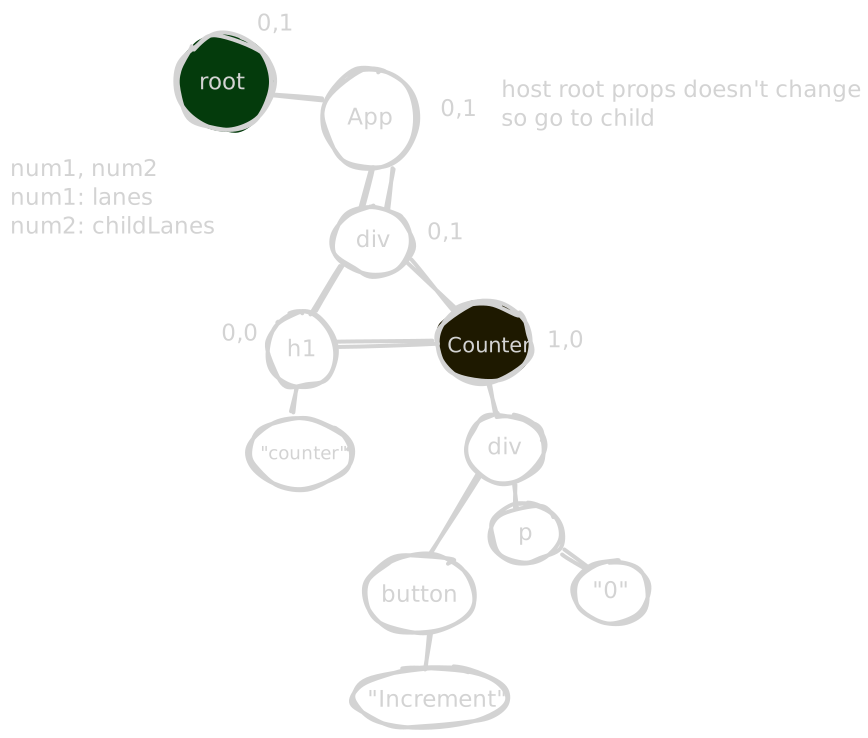
Our Counter component has a lane, it begins re-rendering the Counter component. The function component runs again, producing new React elements for its children. React then reconciles these children, comparing the new elements to the old ones to figure out what has changed. After reconciling, React applies the necessary effects to each child fiber.
When a component re-renders, it generates new React elements for all its children. Even if some children receive the same values as before, they are technically new objects, so React’s equality check === sees them as different. This is why React will re-render those fibers unless you use useMemo or React.memo to preserve references and avoid unnecessary work.
In our example, the only fiber that actually needs an update is the text node inside the <p> tag. React marks this using the fiber’s flags property, which works like a checklist for that fiber. we again use a bitmask here
// this fiber belongs to a textnode inside the p tagFiber.flags |= Update;
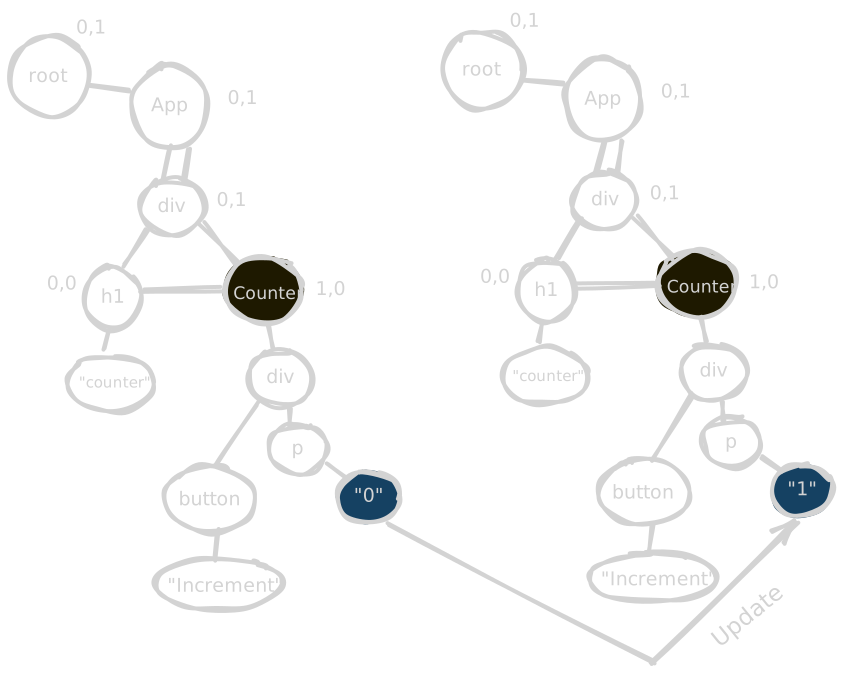
During the commit phase, React can read the flags property and immediately know whether this fiber needs to be updated, deleted, or placed in the DOM
It’s worth noting that the render phase can be either interruptible or uninterruptible depending on the type of update and its priority.
Updates triggered by a click event run in the SyncLane, which is the highest priority, so they are non-interruptible. Similarly, the initial mount of a component uses the DefaultLane and is also uninterruptible. However, rendering updates for lower-priority tasks, such as initial data fetching in concurrent mode, are interruptible, meaning React can pause and resume this work to keep the UI responsive.
Commit
The commit phase is the uninterruptible phase of React. By this point, React has finished all its render work and knows exactly which fibers need updates, insertions, or deletions by looking at the flag property. Now it applies those changes directly to the DOM. Unlike the render phase, React does not pause or yield during this phase. All of this work must finish before the browser can paint the updated UI.
Conclusion
React Fiber is just a smart data structure with a priority system that breaks rendering into small chunks. There is a lot more to cover on the rendering process which I will in upcoming blogs.
- Thanks to @jser for his amazing react internal series