Claude
 Gaia
GaiaA while ago, scrolling Twitter, I stumbled upon this post.
This is a really good post. It sums up so much about React, in the post he mentions this which really had me thinking and it caught my interest to understand more about React
react finally got freedom from the JS callstack. instead of recursive rendering, it’s this iterative stepping through fibers one by one. and that suddenly means react can pause. like just literally stop mid render, drop everything, let the browser repaint, handle input, chill, take a breath, then pick up exactly where it left off inside that huge UI tree. no more “oh no i’m stuck deep in recursion”. you can’t get stuck because react isn’t using the builtin stack anymore. it’s rolling its own
"react finally got freedom from the JS callstack" hmm
this is interesting because what problem would the JS callstack even have so that react had to get rid of it?
Intended audience
This blog is for developers who already know React basics and want to understand how React works internally. You should be comfortable with JavaScript concepts like the call stack and event loop. This blog explores why React Fiber exists from React's perspective, not why React chose this approach over other framework patterns.
To understand the solution, we have to know the problem: what was hindering React's performance, what the React team came up with.
Story of a Single Thread
We know JavaScript is a single-threaded programming language, and for each execution context it only has one thread and a call stack that processes the code line by line. It starts processing from the top to bottom.
function doSomethingHeavy() {for (let i = 0; i < 1_000_000_000; i++) {} // blocks the threadconsole.log("Finished heavy task");}doSomethingHeavy();do_important_task(); // important task
From the above example, once we start the doSomethingHeavy task it will run until it finishes, but let's say
we have an important task below. Our important task is only executed once the doSomethingHeavy loop is finished.
This is a simple synchronous program. JavaScript does support async programming as well, you have probably used async await in
JavaScript. This is done by the event loop.
You might suggest we can swap the position of the doSomethingHeavy() and do_important_task() if we want do_important_task to be executed
first, but right now we know what the important task is. You wrote that function, we know what to place where, but what if it was nondeterministic?
When you are running in the middle of a heavy task, a really important task pops up. You can't stop the running program in the middle and process something; you can't empty the call stack suddenly and start working on something else.
Let's see an example:
import { useState } from "react";

export default function BlockingDemo() {
const [count, setCount] = useState(0);
const [isBlocked, setIsBlocked] = useState(false);

const blockThread = () => {
  setIsBlocked(true);

  setTimeout(() => {
    const start = Date.now();
    let dummy = 0;

    // Block for 3 seconds
    while (Date.now() - start < 3000) {
      dummy += Math.random();
    }

    setIsBlocked(false);
  }, 0);
};

return (
  <div className="container">
    <div className="count">{count}</div>
    <div className="buttons">
      <button onClick={blockThread}>
        {isBlocked ? "Processing.." : "Start Work"}
      </button>
      <button onClick={() => setCount(count + 1)}>
        Click +1
      </button>
    </div>
  </div>
);
}
Try clicking the click +1 after you press start work. start work takes 3 seconds to finish. In that time, even if you press
the click +1 button, the count doesn't increment instantly, you have to wait for 3 seconds. This feels laggy and is a
bad user experience.
React 15
React 15 reconciler walked the component tree using recursive function calls. Once it started, it couldn't stop
function updateComponent(component) {const children = component.render();children.forEach(child => {updateComponent(child); // ← Recursion});}
Every call to updateComponent pushes a new frame onto JavaScript's call stack. For a tree with 1,000 components,
that's 1,000 stack frames, all nested inside each other.
Imagine there is an input box and whatever the user types in that input box will be reflected on screen. The
user typed the first character s, React will start the rendering process, calling updateComponent inside updateComponent
doing recursive calls, your call stack is filled with function calls now. While halfway through, the user typed another
letter a, but now you can't stop. It can't say hold on, the user typed again, let me restart with the new input
JavaScript has no mechanism to pause a call stack, save its state, and resume later. React has to finish processing s before it can even see that you
typed a. Each keystroke triggers another full reconciliation. Each time, React is trapped in recursion while your inputs pile up.
This is why React apps felt laggy.
Priority
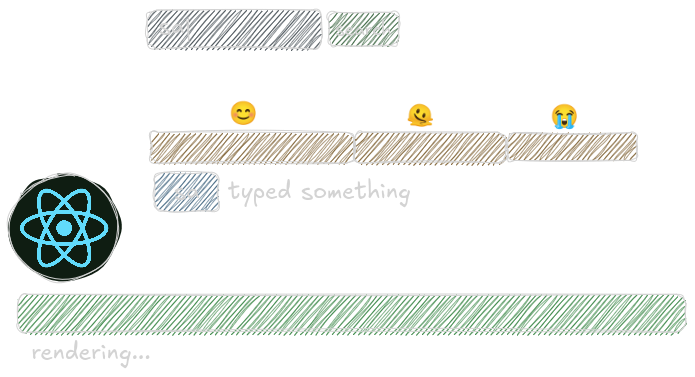
There was a second problem. React treated all updates equally. A button click got the same priority as a background data fetch. An animation got the same priority as logging.
But some updates are urgent (user typing, clicking) and some can wait (analytics, prefetching). React had no way to express this because once reconciliation started, it ran to completion. Everything was equally important because everything blocked everything else.
Let's say you fetch some data from the server, a list of 500 products. The response comes back, and React starts rendering those 500 items to the screen. Halfway through, maybe 250 products rendered, you type a letter in the search box.
What should React do?
Stop rendering those products. Handle the keystroke first. Update the input box immediately. That's what the user cares about, seeing their typing reflected instantly.
The products can wait. A 100ms delay in showing search results? Barely noticeable. But a 100ms delay in seeing your keystroke? That feels broken.
What We Need
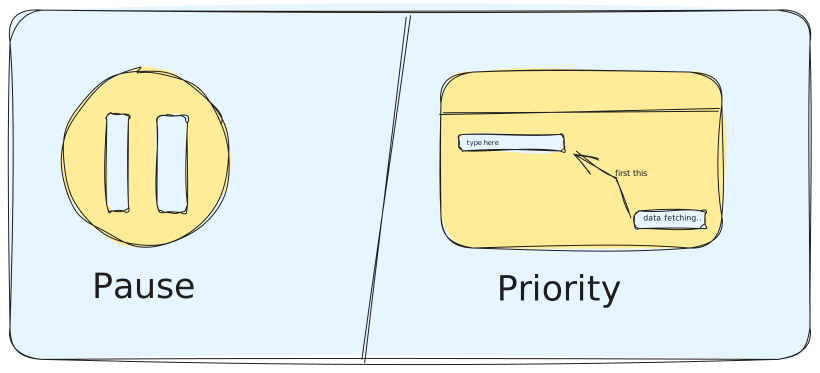
Before we start looking for a solution we should be clear what we are looking for in a solution.
We are facing two main problems with this recursive reconciliation approach:
- we can't pause the rendering process in the middle (callstack level)
- we can't assume every update has the same priority
so, our solution should be able to pause the rendering process if there is another high priority task, pick that up, render it first and continue working where it left off.
why pause at callstack level?
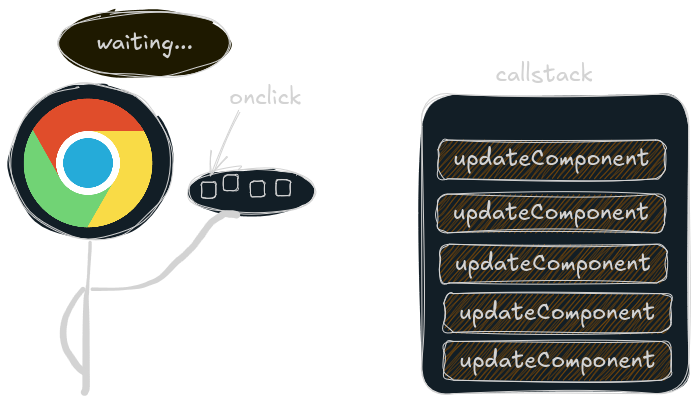
because that's how browsers work, unless your callstack is empty browser can't push the click, keystroke events from macro queue to the callstack.
so browser is just like finish whatever you have in your plate and i will give you more but if your recursive functions take way too long to process, browser won't have the control to push those events in the callstack.
Solution
The React team eventually realized that the problem wasn't just the reconciliation algorithm itself, but how it was being executed.
No amount of small optimizations could fix this, because recursion in JavaScript is fundamentally non-interruptible.
Instead of trying to bend the JavaScript call stack into doing something it was never meant to do, React gave up on the recursive model entirely. They stopped letting the JS engine drive reconciliation and built their own abstraction on top of it.
That abstraction is Fiber.
Fiber doesn't control the callstack, nothing can, because the callstack is fundamentally built into JavaScript itself. What Fiber controls is how we structure and execute our rendering work.
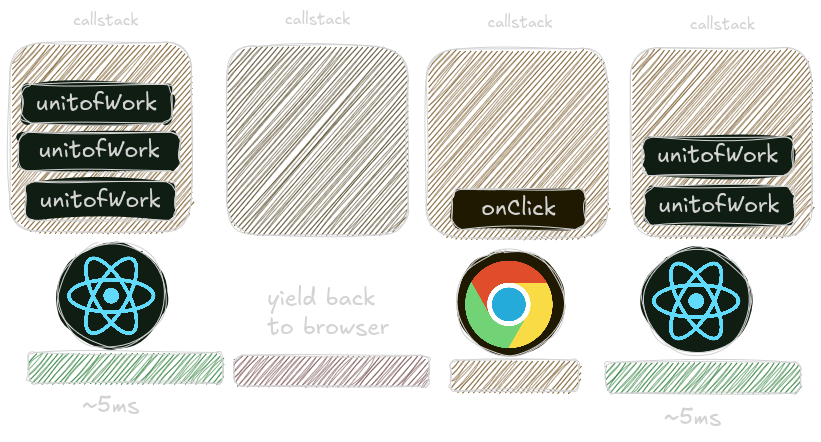
Instead of running the whole render process at once recursively, React now divides the entire reconciliation into small units of work. React processes one unit, then returns control to the browser. The callstack clears. The browser handles any pending events. Then React comes back and processes the next unit.
This happens in small time slices. React works for ~5ms, then yields. The browser breathes. Then React continues where it left off.
The old Scheduler (pre-React 18-ish) used a fixed ~5 ms heuristic in some paths. Modern React scheduler package is frame-aligned and dynamic. It tries to finish before the next frame deadline (~16.7 ms @60 fps, ~8.3 ms @120 fps), yielding earlier only when it knows a higher-priority event is pending or when it's safe.
how the react scheduler works can be a different topic of blog but for simplicity in this blog we will say ~5ms
Fiber as a data structure
So React gave up on recursion. But if you're not using the call stack anymore, you need something else to track your progress through the component tree.
React needed a data structure it could own. Something it could walk through, pause in the middle of, and resume later. Something flexible. That's Fiber. yes, Fiber can refer to both a data structure and an algorithm, depending on the context:
When you write your JSX components, React doesn't just render them directly. It first builds an in-memory representation of your entire UI tree.
const fiber = {type: 'div', // What is this?child: h1Fiber, // Pointer to first childsibling: buttonFiber, // Pointer to next siblingreturn: AppFiber, // Pointer back to parent// ... lots of other stuff React needs};
Each fiber represents one piece of your UI. A component. A div. A
button. Whatever. See those three properties of fiber object? child, sibling, return. These are
pointers. They connect fibers to other fibers, forming like a linked list.
And here's why this matters: React owns this data structure. It's just an object sitting in memory. React can walk it however it wants, stop whenever it wants, and resume whenever it wants.
How Fiber Traversal Works
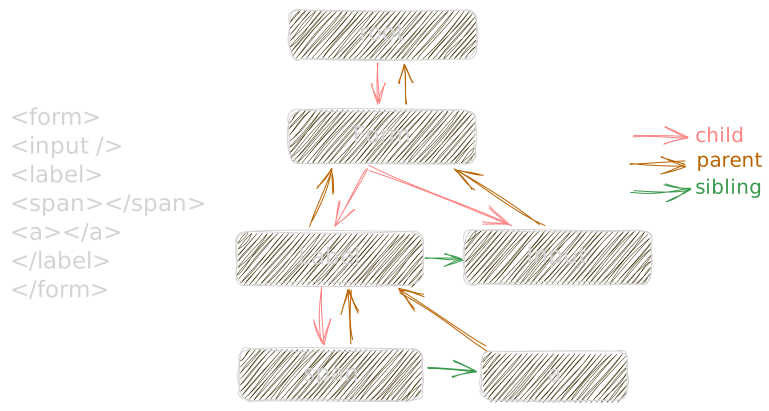
- Step 1: Move to the child
When React finishes performing work on a fiber, the first thing it checks is whether that fiber has a child. If it does, that child fiber becomes the next unit of work.
From our example, once React finishes working on the form fiber, it moves to its child fiber.
- Step 2: Move to the sibling
If a fiber does not have a child, React looks for a sibling fiber.
From the example, the input fiber does not have a child, so React moves to its sibling. In the same way, traversal continues through label, then down to span, and then to a.
- Step 3: Move upward to find work
If a fiber has neither a child nor a sibling, React moves upward using the return pointer. At this point, React looks for the closest parent fiber that has an unvisited sibling.
From the example, once React reaches a fiber that has no remaining child or sibling to visit, it moves back up to the form fiber.
If the parent fiber also does not have a sibling, React keeps moving upward until it reaches the root fiber.
- Step 4: Stop at the root
Traversal continues until React reaches the root fiber and there are no more fibers left to process.
At that point, the render phase is complete.
How Time Slicing Actually Works
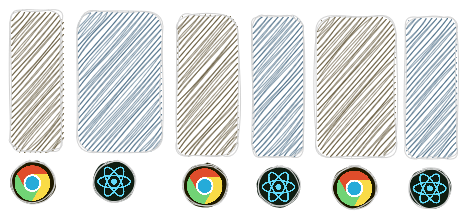
Let's say you type in an input box. That triggers a re-render of 500 search results.
Here's what happens:
The browser gives React about 5 milliseconds to work. Not much time.
React starts walking the fiber tree. It processes the first fiber,
maybe that's your input component. Updates it. Moves to the next fiber
via the child pointer. Processes that. Moves to the next. And the next.
After a few fibers, maybe 10 or 15, React checks the time. "Have I been working for 5ms yet?"
If yes, React stops. It doesn't finish the tree. It just... stops. Saves a pointer to where it was. Exits the function. The call stack clears.
Now the browser gets control back. It handles any pending events your next keystroke, a scroll, a click. It repaints if needed. Does whatever it needs to do.
When the browser is ready, it calls React back. "Hey, you can have another 5ms." React picks up the pointer it saved earlier. "Right, I was on fiber #15." And continues walking from there. This repeats. React works. Browser breathes. React works. Browser breathes. Back and forth, cooperating, until all 500 fibers are processed.
Your typing feels instant because the browser handles each keystroke within 5ms. React is rendering in the background, in little chunks, without blocking you.
Conclusion
So that’s basically what Fiber is about.
I see some discussions on internet people talking why use fiber architecture, there exist other libraries like vue, solidjs which use a more reactive approach.
Sure, other frameworks like Vue or SolidJS do it differently. They use reactive signals or fine-grained tracking to only update what actually changes. That's faster in some scenarios, but it comes with its own trade-offs.
React's approach is all about flexibility, predictability, and backward compatibility. Your components stay pure functions of state, your mental model stays simple, and Fiber quietly handles all the messy scheduling.
At the end of the day, React still sticks to its core philosophy.

The function is the representation of UI of the state.
Thanks for reading ❤️
Read more: