
 Claude
 Gaia
GaiaI'm sure most React developers have gone through this once, updating the state and trying to console.log it in the next
line and wondering for an hour why the state isn't changing.
Let's start with a few examples and we will dig deeper.
import { useState } from "react"; import "./styles.css"; export default function App() { const [count, setCount] = useState(0); const [stale, setStale] = useState(0); const [updated, setUpdated] = useState(0); const handleLogAfterSet = () => { setCount(count + 1); console.log(`After setCount: ${count}`); }; const handleSetThreeTimes = () => { setStale(stale + 1); setStale(stale + 1); setStale(stale + 1); }; const handleSetWithUpdater = () => { setUpdated(prev => prev + 1); setUpdated(prev => prev + 1); setUpdated(prev => prev + 1); }; return ( <div className="container"> <div className="card"> <span className="label">console.log after setState</span> <span className="count">{count}</span> <button className="btn" onClick={handleLogAfterSet}>increment</button> </div> <div className="card"> <span className="label">setState(val + 1) x3</span> <span className="count">{stale}</span> <button className="btn" onClick={handleSetThreeTimes}>increment x3</button> </div> <div className="card"> <span className="label">setState(prev => prev + 1) x3</span> <span className="count">{updated}</span> <button className="btn" onClick={handleSetWithUpdater}>increment x3</button> </div> </div> ); }
const handleLogAfterSet = () => {setCount(count + 1);console.log(\`After setCount: \${count}\`);};
Try clicking the first increment button and check the console tab. You will still see 0 as a value instead of
1. Hmm, that seems odd, isn't it?
const handleSetThreeTimes = () => {setState(stale + 1);setState(stale + 1);setState(stale + 1);};
Click the second increment button. You would expect it to increment 3 times, but it only increments once.
Hmm, that seems odd again.
const handleSetWithUpdater = () => {setUpdated(prev => prev + 1);setUpdated(prev => prev + 1);setUpdated(prev => prev + 1);};
Now click the 3rd increment button. Well, now it does increment three times. What is going on here?
React is easy to get started with, but soon we crash into weird issues like these that make us wonder what the hell is even going on, and it's often what we think of how it works vs how it is actually working.
If you already have answers to all of these, then we will dig deeper into how it's working internally, but if you don't know, it's fine, we will understand this anyway.
Intended audience
This blog is for developers who already know React basics and want to understand how React works internally. You should be comfortable with JavaScript concepts like the call stack, event loop, and task queues, and some basics of React Fiber and the new reconciliation algorithm.
Mental Model
We often hear this phrase UI = f(state). It’s actually very literal. Your component is just a function. It takes some state, and it returns UI.
Now here’s where most of us get it wrong.
When we call setCount(count + 1), it feels like we are mutating count. Like the variable itself just changed from 0 to 1. But React doesn’t work like that. It doesn’t reach inside your function and mutate variables.
Instead, React simply runs your component again.
Let’s take a simple example.
function Counter() {const [count, setCount] = useState(0);return <button>{count}</button>;}
On the first render, React calls Counter(). Inside that function call, count is 0. That render finishes. Done. Now when you call setCount(count + 1);
You’re not mutating count. You’re basically telling React, Hey, run my Counter function again. But this time, give it a different state value.
So what actually happens looks more like this:
- First call: Counter() count is 0
- Later: Counter() count is 1
Fiber Node
React reads your JSX components and creates this in-memory UI tree called Fiber. This fiber
tree is made of different FiberNode
function FiberNode(this: $FlowFixMe,tag: WorkTag,pendingProps: mixed,key: ReactKey,mode: TypeOfMode,) {...// Tree structurethis.return = null; // Parent fiberthis.child = null; // First child fiberthis.sibling = null; // Next sibling fiber...// Statethis.memoizedState = null; // (hooks for function components)...}
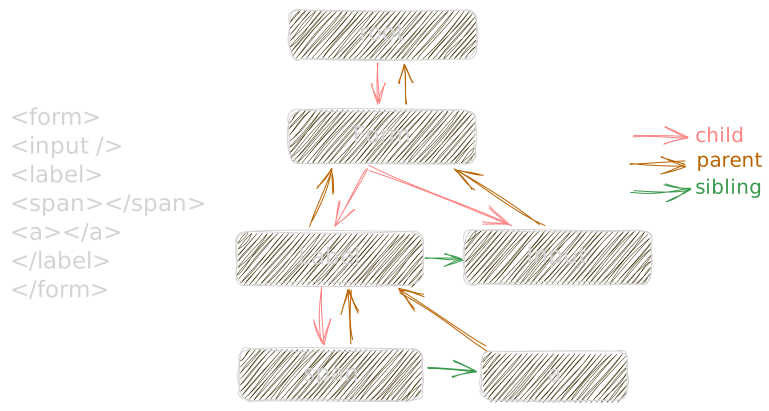
Each fiber represents one piece of your UI. A component. A div. A button. Whatever. See those three properties in FiberNode? child, sibling, return. These are pointers. They connect fibers to other fibers, forming like a linked list.
And here's why this matters: React owns this data structure. It's just an object sitting in memory. React can walk it however it wants, stop whenever it wants, and resume whenever it wants.
I have another blog if you want to read, understanding why react fiber exists
memoizedState
Once you start reading the source code, you realize something interesting: hooks are not stored in some abstract state bucket. They are attached directly to the component’s Fiber.
Say you have a simple App component.
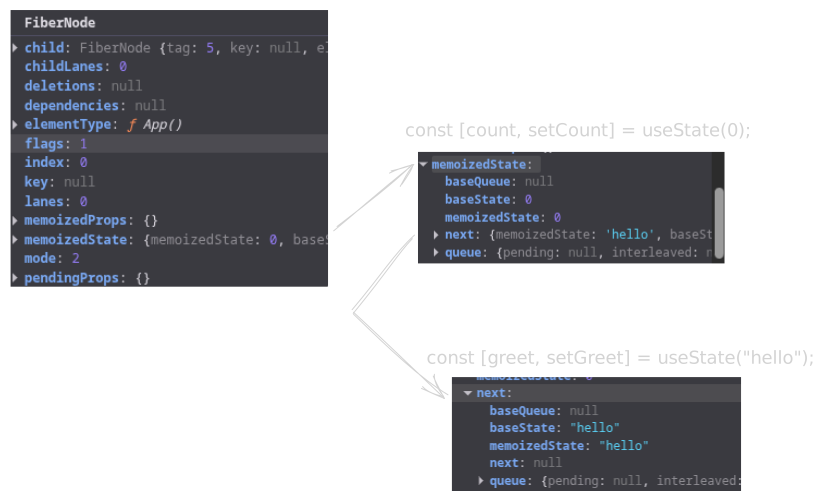
function App(){const [count, setCount] = useState(0);const [greet, setGreet] = useState("hello");return <>...</>}
When React renders App, it creates a FiberNode to represent this component in the tree. That fiber has a property called memoizedState. The name sounds like it holds a single value, but it actually holds the entire hook chain for the component.
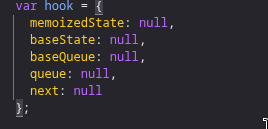
Internally, memoizedState is the head of a linked list. It's nothing but just a hook object.
Each time React encounters a hook call during initial rendering, it creates a hook object and appends it to this list.
In our example, two hooks are called in order: useState(count), useState(greet). So React builds a chain of two hook nodes, each pointing to the next through a next pointer. The last one points to null.
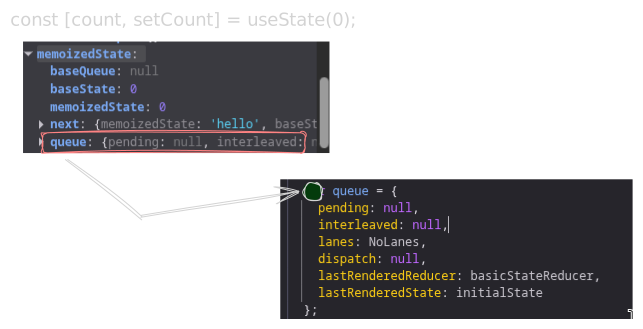
One more thing we have to take a look at before we actually see how state update is working internally is a queue
property inside a hook object.
This queue is where React batches the updates before it actually starts rendering. Don't worry, we will go into detail.
These are some prior knowledge I wanted to discuss before we actually dig in.
State update is not synchronous
I hope you are ready to dive into React internals now. Let's start with an example.
const handleClick = () => {const isHuman = trueif(isHuman){console.log("Hello Human 👋");}else{console.log("😲😲");}setCount(count + 1);console.log(count)}<button onClick={handleClick}>click me</button>
The state setter function you get from the useState hook is nothing but just a dispatchSetState internally. When
you use the setCount, React internally calls the dispatchSetState.
When you click a button, handleClick execution starts. It begins to run synchronously. The moment
you come to
setCount(prev+1)
React calls a dispatchSetState function. The purpose of this function is to enqueue the update in a queue
and schedule it for rendering.
dispatchSetState
Let's dig into this function
function dispatchSetState<S, A>( fiber: Fiber, queue: UpdateQueue<S, A>, action: A,) { const lane = requestUpdateLane(fiber); const update: Update<S, A> = { lane, action, hasEagerState: false, eagerState: null, next: null as any, }; if (isRenderPhaseUpdate(fiber)) {Fast path: eager compute + bailout}React will first request a lane. lane in React is the priority of the update. If the state change is from
a button click, then we need this update to reflect immediately, so we need to set a higher priority compared to a fetch response.
In our case it's a button click, so it's going to be a 1.
function dispatchSetState<S, A>( fiber: Fiber, queue: UpdateQueue<S, A>, action: A,) { const lane = requestUpdateLane(fiber); const update: Update<S, A> = { lane, action, hasEagerState: false, eagerState: null, next: null as any, }; if (isRenderPhaseUpdate(fiber)) {Fast path: eager compute + bailout}React creates an update object, first enqueuing that update object into a memoizedState.queue. Remember we discussed this earlier?
The update object contains different properties like eagerState, action, and next.
- action is the callback function you pass in your setState function,
(prev)=>prev+1 - next is the pointer to another update. Updates are stashed in a
memoizedState.queuein a circular linked list.
function dispatchSetState<S, A>( fiber: Fiber, queue: UpdateQueue<S, A>, action: A,) { const lane = requestUpdateLane(fiber); const update: Update<S, A> = { lane, action,// 21 lines collapsed const eagerState = lastRenderedReducer(currentState, action); update.hasEagerState = true; update.eagerState = eagerState; if (is(eagerState, currentState)) { enqueueConcurrentHookUpdateAndEagerlyBailout( fiber, queue, update, ); return; } } catch (error) { } finally { if (__DEV__) { ReactCurrentDispatcher.current = prevDispatcher; } } } } const root = enqueueConcurrentHookUpdate(fiber, queue, update, lane); if (root !== null) { const eventTime = requestEventTime(); scheduleUpdateOnFiber(root, fiber, lane, eventTime); entangleTransitionUpdate(root, queue, lane); } }}eagerState is your state value calculated. If you look at the condition if (is(eagerState, currentState)),
it means we are checking if the current state update and the previous one are the same, then we don't even need to re-render,
so we will bail out early.
setState(prev=>prev)
There is no point in keep re-rendering here as the value will be 0. But this bailout mechanism is not guaranteed as well. We will discuss
this in another blog.
Remember, we haven't started rendering yet.
function dispatchSetState<S, A>( fiber: Fiber, queue: UpdateQueue<S, A>, action: A,) {Fast path: eager compute + bailout } } } const root = enqueueConcurrentHookUpdate(fiber, queue, update, lane); if (root !== null) { const eventTime = requestEventTime(); scheduleUpdateOnFiber(root, fiber, lane, eventTime); entangleTransitionUpdate(root, queue, lane); } }}Now our update object is ready, so enqueueConcurrentHookUpdate will attach the update to the hook’s update queue,
and it will move upward from this fiber node all the way up to the root, marking it dirty. When React starts
rendering, it starts from the top level and checks if this fiber node and its children have an update or not,
and if both don't contain any update, we can skip that subtree.
function dispatchSetState<S, A>( fiber: Fiber, queue: UpdateQueue<S, A>, action: A,) {Fast path: eager compute + bailout } } } const root = enqueueConcurrentHookUpdate(fiber, queue, update, lane); if (root !== null) { const eventTime = requestEventTime(); scheduleUpdateOnFiber(root, fiber, lane, eventTime); entangleTransitionUpdate(root, queue, lane); } }}Now finally we schedule a render. Notice the wording carefully. We schedule it. We don’t start rendering immediately.
Let’s go back to handleClick.
setCount did its job. It created an update and told React that this component needs to re-render. That’s it. Then JavaScript keeps running. React does not pause your function halfway. So execution reaches console.log(count)
And you still see 0. Why?
Because setCount did not mutate count inside this render. It only queued a new render with a different value. The count variable you’re logging belongs to the current render.
Right now, you’re still inside the old snapshot.
That’s why it logs 0
Batching
Say your handleClick had a few more setState functions below.
Here setCount(count+4) and setGreet("Namaste!") will again call dispatchSetState and go through the whole process,
keeping stashing the update object into a hook's queue.
React lets the entire event handler finish executing. JavaScript runs top to bottom. Only after handleClick fully exits does React move to the next phase.
At that point, React begins the render phase. Once the event handler finishes, React starts rendering.
Now it goes to the count hook and looks at the queued updates. Instead of applying them immediately when you called setCount, React waits and then applies them in order during the next render.
Action
Now let’s talk about setCount(count + 1) vs setCount(prev => prev + 1) and why this difference actually matters.
To understand this, we have to look at what React really stores when you call setState. It does not store the next value. It stores an update object.
const update: Update<S, A> = {lane,action,hasEagerState: false,eagerState: null,next: null as any,};
The important part here is action. When you write
setCount(count + 1);
you are passing a value as the action. There is nothing to compute later. React just stashes that value inside the update object.
Now remember, updates are queued first. The render has not restarted yet. The count you read here is still the stale value, which is 0.
So when you do:
setState(stale + 1);setState(stale + 1);setState(stale + 1);
what you are really saying is:
“On the next render, set the state to 1.” Three times.
When React processes the update queue during rendering, it applies those updates one by one, but each update just overwrites the state with 1. Nothing accumulates.
Now with
setState(prev => prev + 1);setState(prev => prev + 1);setState(prev => prev + 1);
Here, the action is not a value. It is a function.
You are not telling React what the next state is. You are telling React how to calculate the next state. So React stashes three update objects, each holding a reducer function.
During the next render, React starts with the base state and applies updates in order. For each update, it calls the action function with the latest computed state. This is why the functional form works even with multiple updates in the same event.
Conclusion
This blog ended up way longer than I expected, but it was really interesting even for me to explore how state updates actually work internally. And this is still just a small part of what React really is.
Thanks for reading ❤️