
 Claude
 Gaia
GaiaThe Intro
React supported streaming long before server components. React 18 already had renderToPipeableStream() and
renderToReadableStream(). And it's also not a new thing on the browser side either. Browsers natively support streaming HTML,
they start rendering as they receive chunks.
See this simple demo.
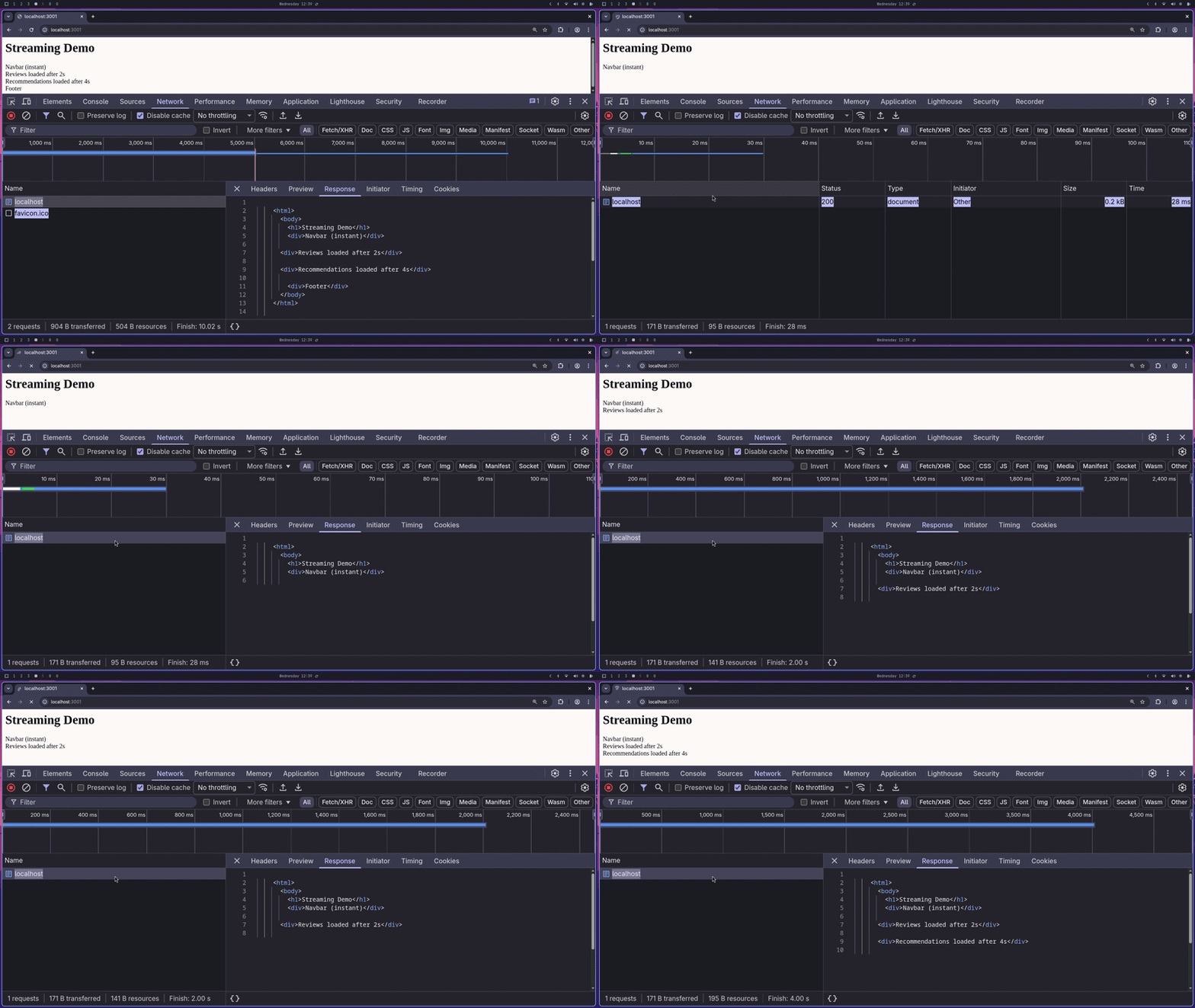
Most streaming follows an order where you would see chunk(1), chunk(2) ... chunk(N-1), chunk(N).
But the interesting thing about React Server Components and Suspense is that it doesn't follow that order. You can stream components in any order like component(2), component(N) ... component(1). That's what this blog is about.
Intended audience
This blog is for React developers who are comfortable with basic React concepts like Suspense and Server Components. This blog focuses on how React handles streaming internally and what makes out-of-order streaming different from regular streaming.
Traditional SSR
Take this as an example:
async function ProductPage() {const product = await getProduct(); // 50msconst recommendations = await getRecommendations(); // 800msconst reviews = await getReviews(); // 300msreturn (<><Navbar /><ProductDetails product={product} /><Reviews reviews={reviews} /><Recommendations recommendations={recommendations} /><Footer /></>);}
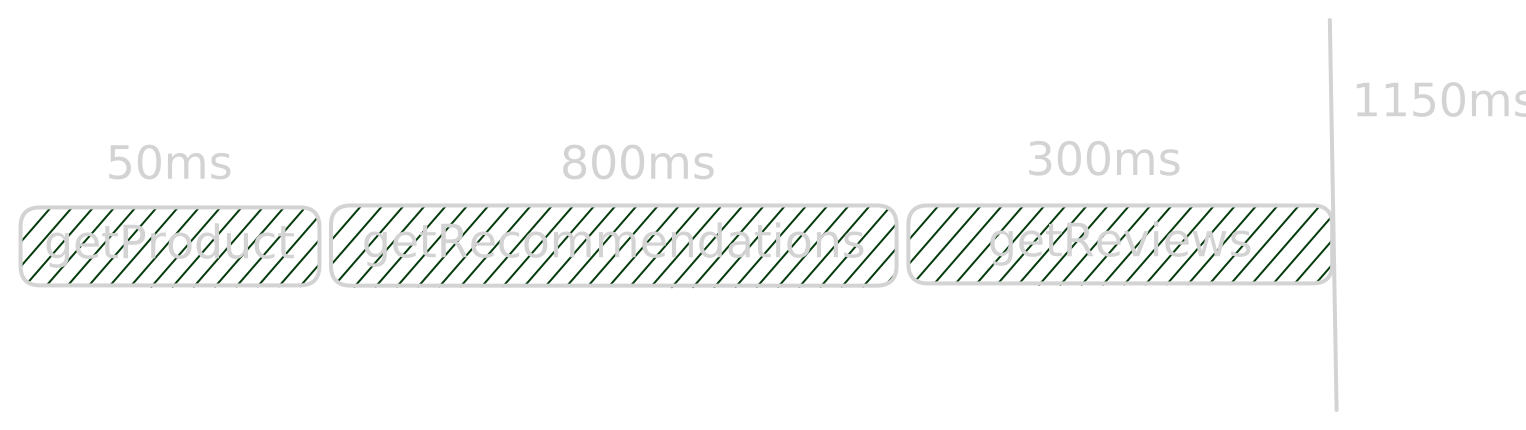
you might say Sanku, you're just creating a waterfall here. fetch them in parallel.
Fair let's do that
async function ProductPage() {const product = getProduct(); // 50msconst recommendations = getRecommendations(); // 800msconst reviews = getReviews(); // 300msreturn (<><Navbar /><ProductDetails product={product} /><Reviews reviews={reviews} /><Recommendations recommendations={recommendations} /><Footer /></>);}
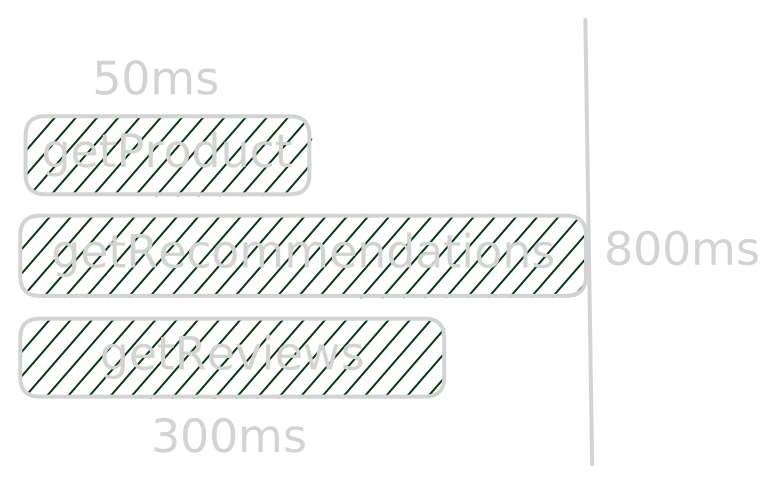
now all three fire at the same time.YAY....but we still have a problem.
The page waits for all three to finish before it sends a single byte of HTML. Here even though Footer and Navbar have nothing to do with data fetching, they are still blocked. The whole page waits for getRecommendations() to finish before anything is sent.
It would be really nice if we could let the user see components that don't need data right away.
Streaming
Okay, we can solve this by introducing streaming.
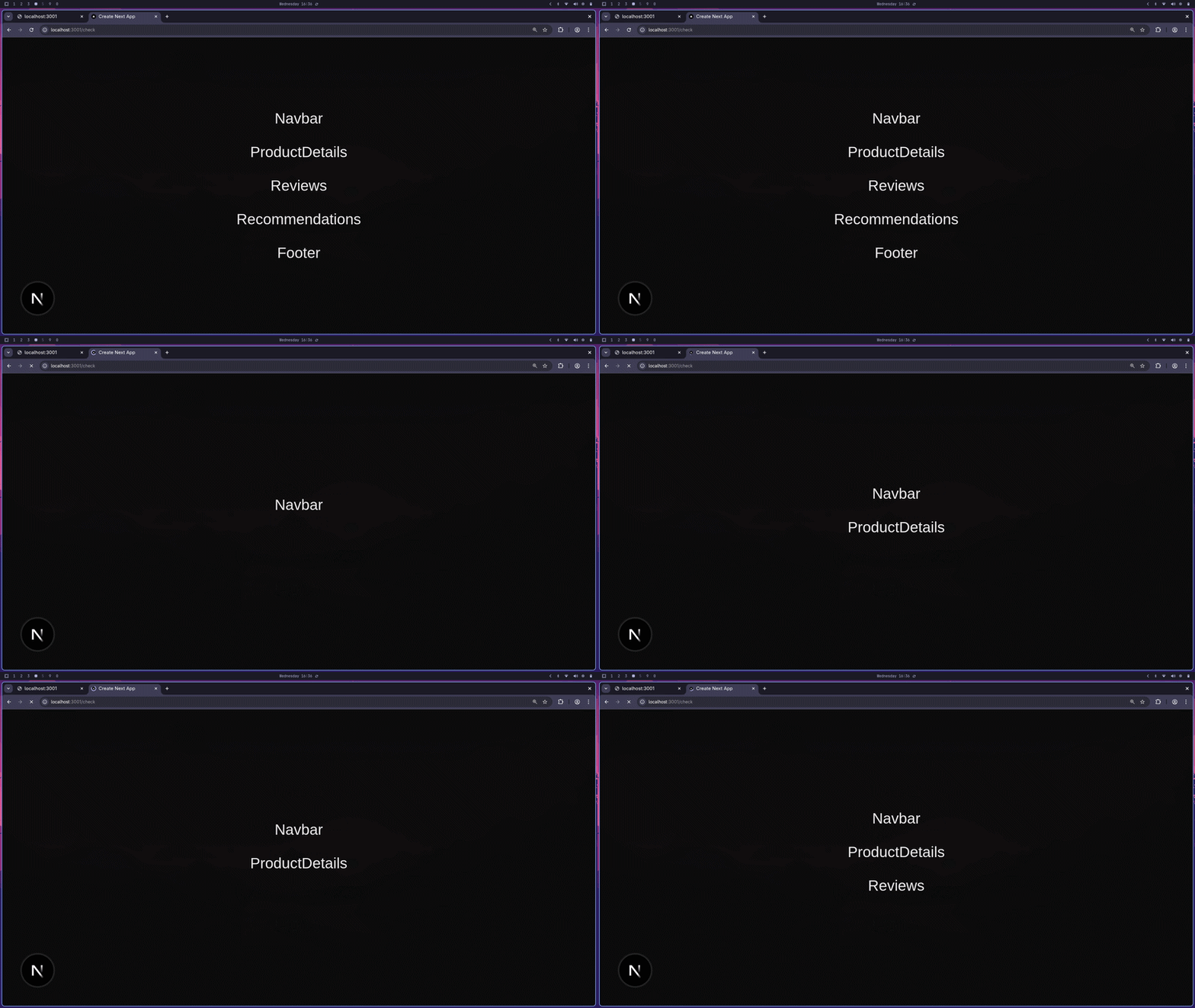
But streaming alone has a limitation, did you spot it?
In-order streaming
Even though we are streaming and the user doesn't have to wait for ProductDetails to see Navbar, the Footer is still blocked because Recommendations is still loading. This is called in-order streaming. Each component comes in sequence, in the order they appear in the HTML.
Note
This was a deliberate attempt to show you in-order streaming in Next.js. You can't do it directly.
Out-of-order streaming
In-order streaming solves a problem but doesn't fully solve the problem.
what if we could send Navbar and Footer immediately, drop a placeholder(marker) where the slow components will go, and then swap those placeholders with the real content once the data is ready? No waiting, no blocking, completely independent.
That's out-of-order streaming. There is no specific order. Components arrive whenever their data is ready.
React 18 introduced renderToPipeableStream which made this possible. React 19 stabilized React Server Components, making it way more ergonomic to use. You wrap your slow components in <Suspense> with a fallback UI, and React handles the rest.
async function ProductDetails() {await delay(50);return <section>ProductDetails</section>;}async function Reviews() {await delay(800);return <section>Reviews</section>;}async function Recommendations() {await delay(300);return <section>Recommendations</section>;}export default function Page() {return (<main><Navbar /><Suspense fallback={<div>loading...</div>}><ProductDetails /></Suspense><Suspense fallback={<div>loading...</div>}><Reviews /></Suspense><Suspense fallback={<div>loading...</div>}><Recommendations /></Suspense><Footer /></main>);}
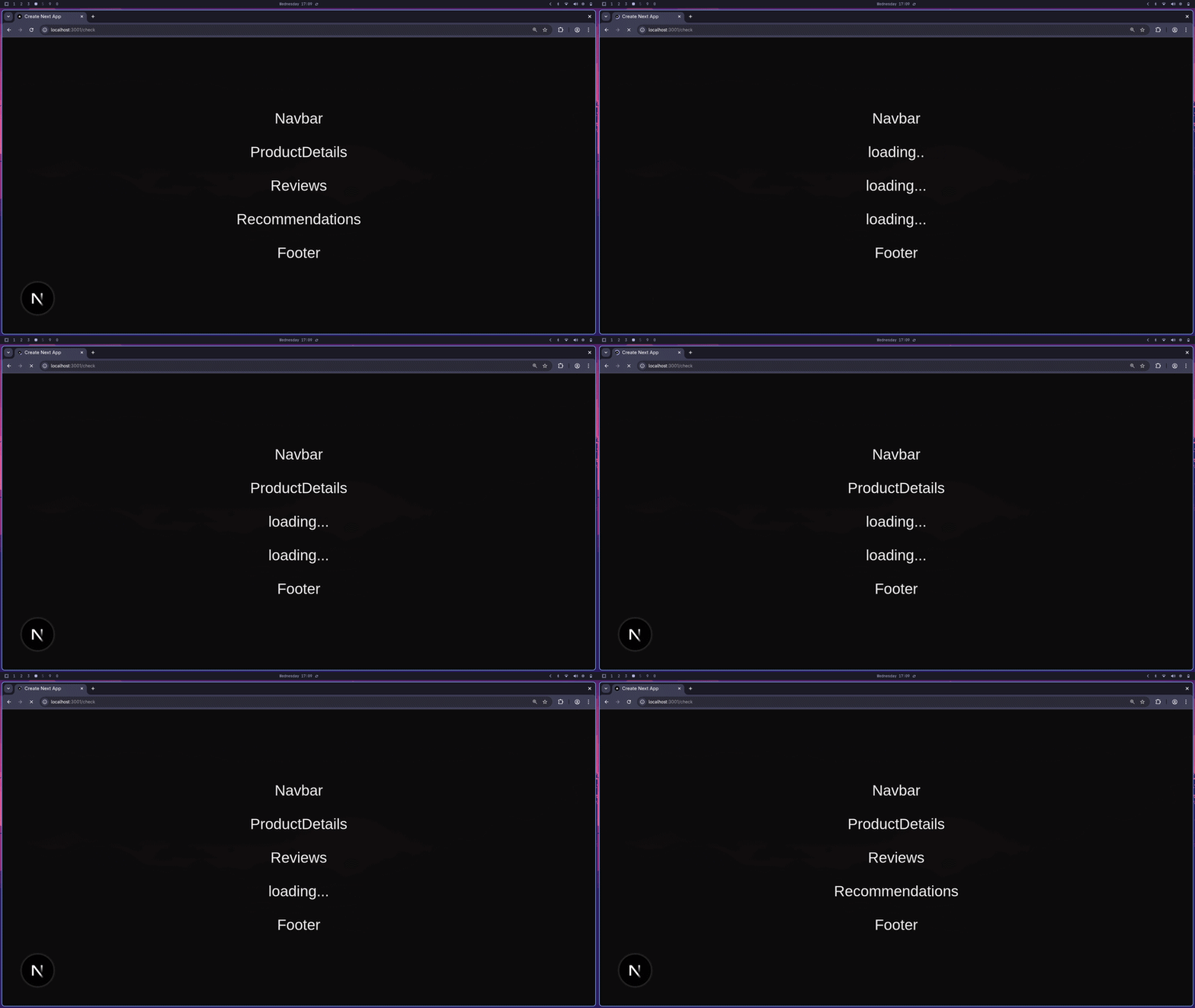
Note
I have increased the delay timings(1s, 2s, 3s) on the demo gif so that it's easier for you to follow along
Pretty cool right? Now let's dig into how React actually pulls this off.
Internals
The trick React uses is simple when you say it out loud: send what you have immediately, leave a marked placeholder for what you don't, then swap it using JavaScript once the server resolves the data.
That's it. Everything below is just the implementation of that idea.
If you look at the actual HTML stream coming from the server, you would see something like this:
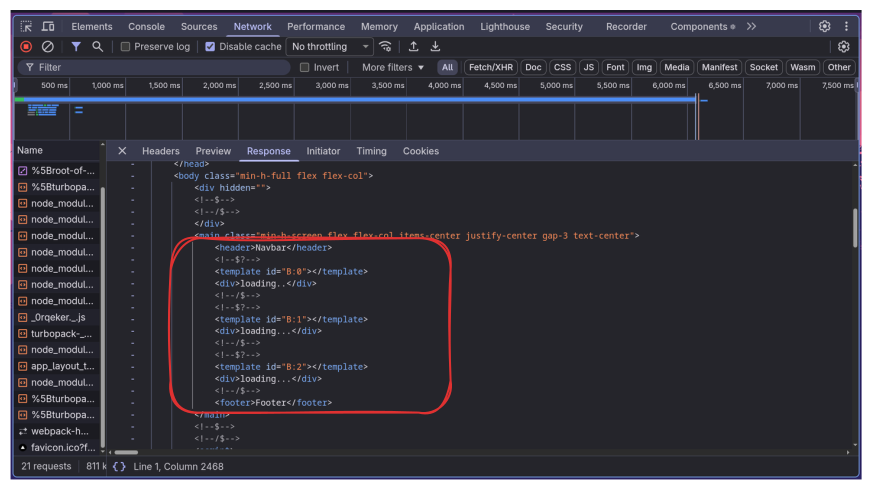
<header>Navbar</header><!--$?--><template id="B:0"></template><div>loading..</div><!--/$--><!--$?--><template id="B:1"></template><div>loading...</div><!--/$--><!--$?--><template id="B:2"></template><div>loading...</div><!--/$--><footer>Footer</footer>
Navbar and Footer are already there. The slow components each have a suspense boundary with a fallback div.
Let's look at ProductDetails specifically:
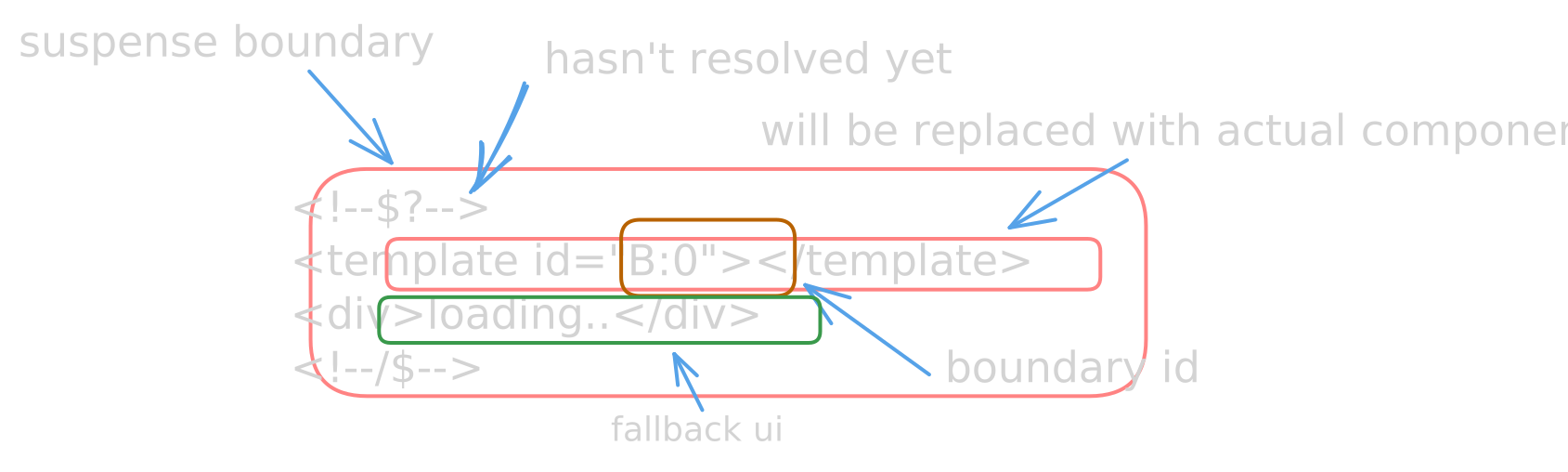
<!--$?--><template id="B:0"></template><div>loading..</div><!--/$-->
<!--$?--> and <!--/$--> are the suspense boundary markers. The <template> tag is the placeholder that will get replaced. The <div>loading..</div> is your fallback UI.
id="B:0" is how React identifies which placeholder to swap when the resolved component arrives.
The $? in the comment means the suspense boundary is still pending, the fallback is showing and we haven't received the real data yet.
At this point I strongly recommend opening a Next.js project, popping open DevTools, and checking the network tab. Seeing the hidden divs and script tags streaming in live makes everything click way faster than reading about it.
Component back to client
Once the data resolves on the server, React streams the component back to the client. It looks like this:
<div hidden id="S:0"><section>ProductDetails</section></div>
Notice it's a hidden div. React doesn't put it directly in the right place, it parks it off-screen with id="S:0". Then right after, it streams a small <script> tag:
<script>$RC("B:0", "S:0")</script>
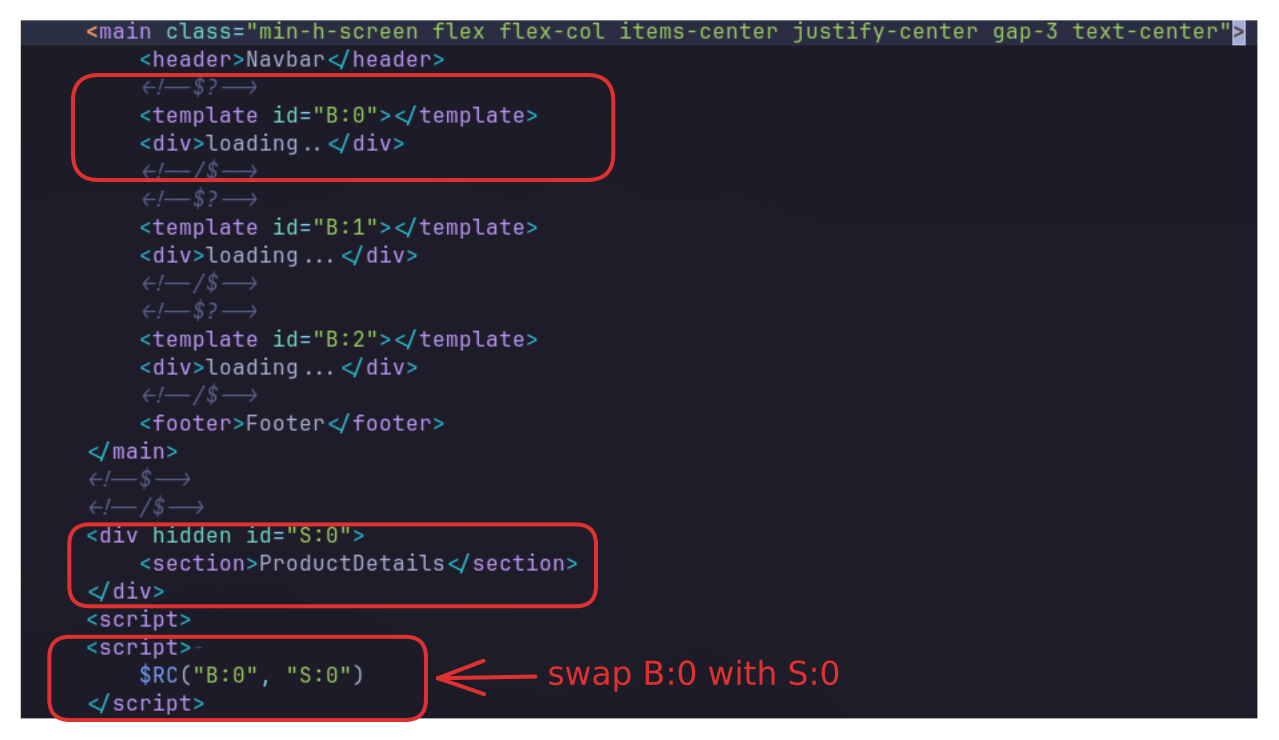
This is where the swap happens. $RC is a function React already sent earlier in the stream so the client has it ready. Let's look at all three functions React uses to make this work.
<script> $RB = []; $RV = function (a) { $RT = performance.now(); for (var b = 0; b < a.length; b += 2) { var c = a[b], e = a[b + 1]; null !== e.parentNode && e.parentNode.removeChild(e); var f = c.parentNode; if (f) {// 51 lines collapsed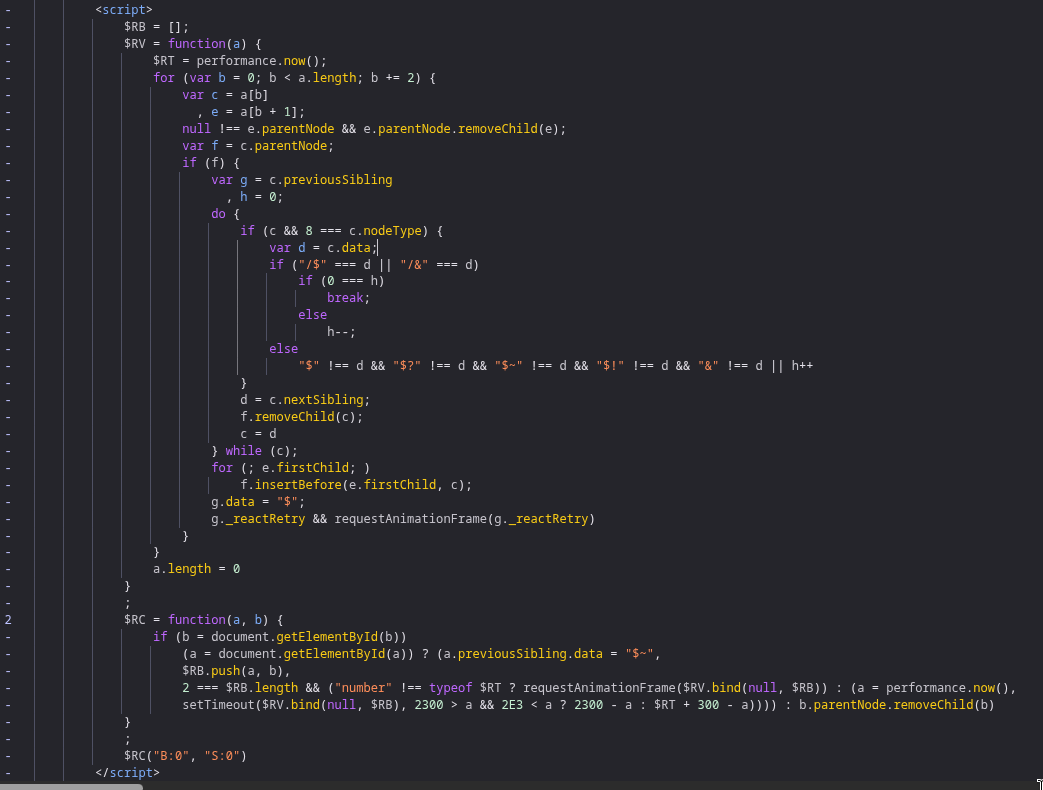
Three things to focus on: the $RB queue, the $RC function, and the $RV function.
$RC
$RC = function(a, b) {if (b = document.getElementById(b))(a = document.getElementById(a))? (/* replace logic */): b.parentNode.removeChild(b)}
$RC takes two arguments. a is the template id like B:0 and b is the resolved component id like S:0.
First it tries to find the resolved component div using document.getElementById(b). If it can't find it, it removes the component and does nothing. If it finds it, it then looks for the template element using document.getElementById(a).
If the template is found, it marks the suspense boundary as queued by changing $? to $~ on the previous sibling comment node, then pushes both elements into the $RB queue:
a.previousSibling.data = "$~"$RB.push(a, b)
Once $RC has a complete pair, the template and the resolved component, it calls $RV using requestAnimationFrame to do the actual DOM swap.
$RB
$RB is just an array acting as a queue. React pushes pairs of [template, resolved] into it. The actual swap doesn't happen on every $RC call, it waits until there's at least one pair and schedules $RV to run on the next frame.
$RV
This is where the actual swap happens.
$RV = function(a) {for (var b = 0; b < a.length; b += 2) {var c = a[b], // template element (B:0)e = a[b+1]; // resolved component (S:0)...}}
It loops through $RB two items at a time since we push pairs.
First it detaches the resolved component from its hidden div so it's no longer hidden.
Then it walks through all the sibling nodes inside the suspense boundary, removing them one by one. This is how it clears the fallback UI. Those loading spinners you wrote? Gone.
do {d = c.nextSibling;f.removeChild(c);c = d;} while (c);
Then it takes all the children from the resolved component and inserts them before the closing comment of the suspense boundary.
for (; e.firstChild;) f.insertBefore(e.firstChild, c);
Finally it updates the boundary comment from $~ to $, meaning the suspense is resolved. If there's a _reactRetry attached to the boundary node it fires that too, which is how React handles concurrent mode retries.
The $? → $~ → $ progression is the full lifecycle of a suspense boundary:
$? = pending (fallback is showing)$~ = queued (resolved content is ready, waiting for RAF)$ = complete (actual content is in the DOM)
Breaking the suspense
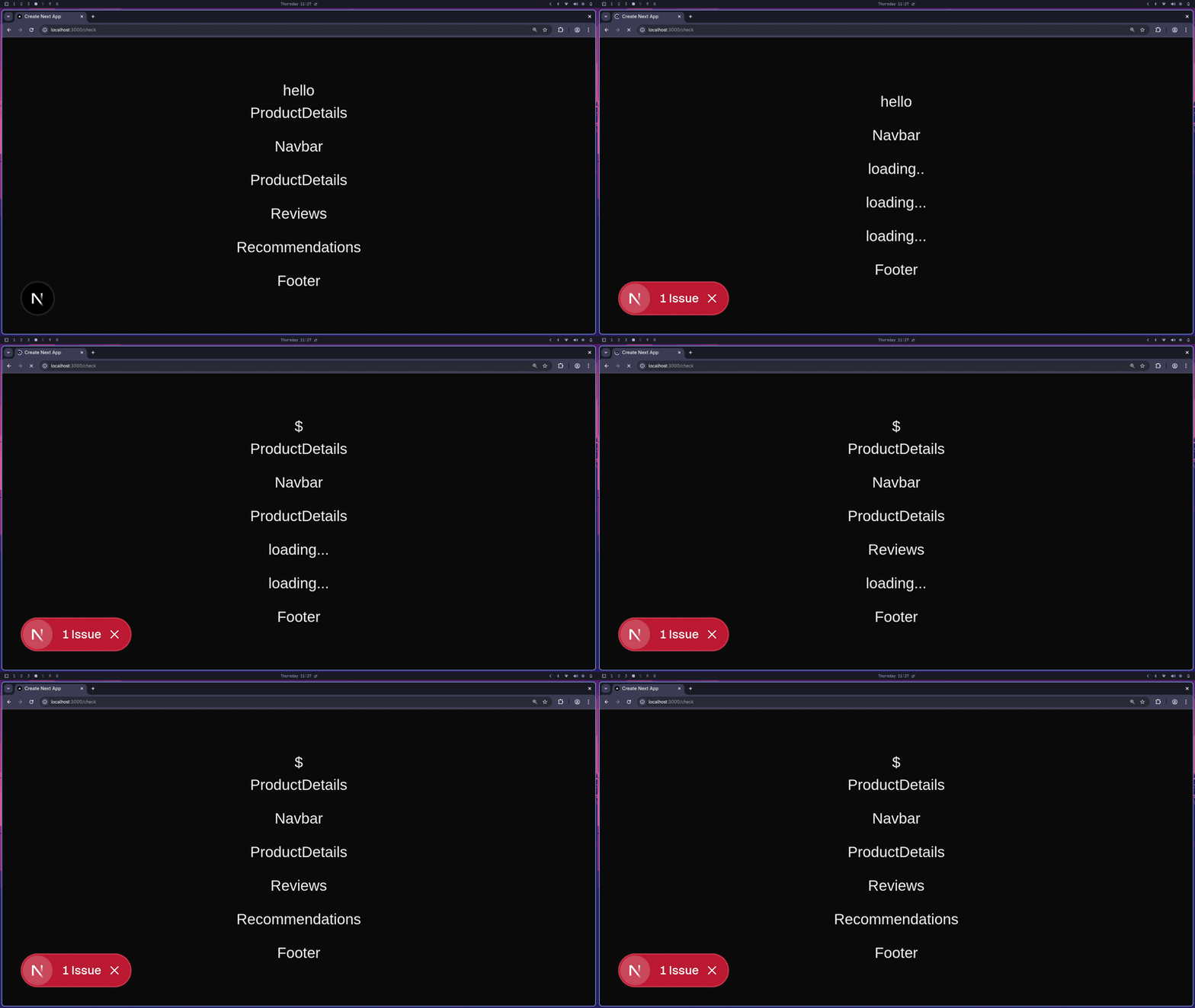
since React is just looking for <template id="B:0"> in the DOM, what happens if you manually put one in yourself?
<main >--<div>hello<template id="B:0">hello testing</template></div>--<Navbar /><Suspense fallback={<div>loading..</div>}><ProductDetails /></Suspense><Suspense fallback={<div>loading...</div>}><Reviews /></Suspense><Suspense fallback={<div>loading...</div>}><Recommendations /></Suspense><Footer /></main>
i intentionally added a <template id="B:0"> inside a random div. React doesn't know it's a fake. when $RC("B:0", "S:0") runs, it just does document.getElementById("B:0") and it finds yours first.
so instead of swapping the actual ProductDetails placeholder, it swaps your random div.
Putting it all together
This is what makes React's streaming different from just chunking HTML. A regular HTML stream is forced to be in order because HTML parsing is sequential. React works around this by using the DOM as a staging area, sending components as hidden divs, and using JavaScript to place them in the right spot at the right time.
I hope you enjoyed reading the blog ❤️
Special thanks to @render for catching few things I missed.