
 Claude
 Gaia
GaiaIntro
I have been experimenting with building a small version of React Server Components to understand how the system works internally.
This blog is not about why RSC is useful or what benefits it brings. It's more focused on how it actually works under the hood, especially how the server and client parts of a React app end up split during build time.
Interesting Parts
React Server Components have a protocol called the Flight protocol, which generates a Flight stream. This is not real JSON, but it looks similar in structure. It is closer to a structured wire format that React can parse incrementally while streaming.
One reason this format is not plain JSON is that React needs to support values that JSON normally cannot represent cleanly during serialization, such as async boundaries and server-side computations that may resolve over time.
const promise = new Promise((resolve) => {setTimeout(() => resolve("Sanku"), 1000);});const json = JSON.stringify(promise); // => '{}'
Instead of trying to force everything into JSON semantics, React uses a custom format that can represent these cases in a streaming way.
Take this as an example:
// Server-Component.tsxasync function Page() {const user = await db.user.findFirst()return (<div><h1>Dashboard</h1><p>{user.name}</p><Counter /></div>)}
During runtime, the RSC renderer will generate a Flight stream for this, which would look something like this:
0:["$","div",null,{"children":[["$","h1",null,{"children":"Dashboard"}],["$","p",null,{"children":"Sanku"}],["$","$L1",null,{}]]}]1:I["./Counter.js",["client"],"default"]
On the client side, this stream is reconstructed back into a React tree. The server sends server components as finished, rendered elements, but client components are sent as a reference ($L1) that the browser fills in later using the referenced modules.
Don't worry if this doesn't make sense yet, we will look into it in more detail below.
Let's Begin
A React UI is a tree. Some branches of this tree run on the server, and some branches run in the browser.
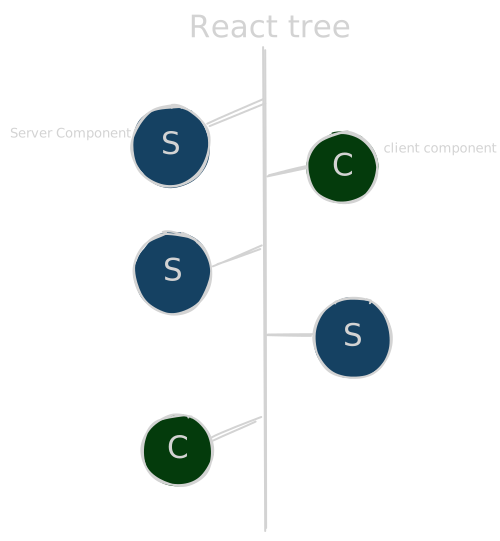
In a React Server Components setup, we are no longer dealing with a single build target. Instead, the same codebase is processed from two perspectives: a server world and a client world.
Conditional Exports
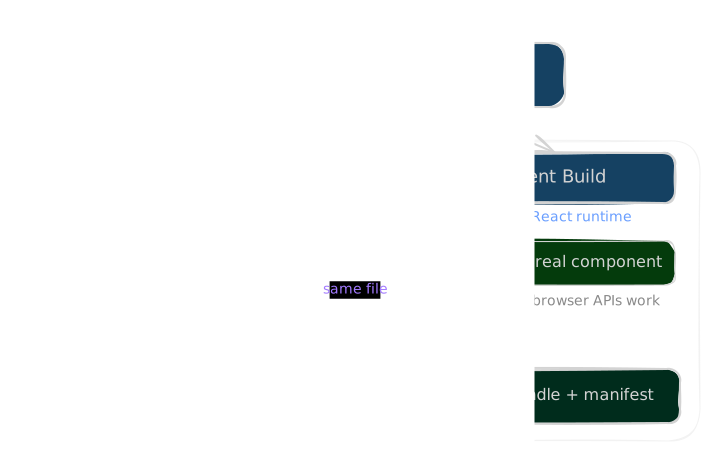
One interesting thing here is that React does not expose the exact same implementation to both environments. When we build an RSC app, we are effectively building for two different runtimes.
example code:
async function Page() {const user = await db.user.findFirst();return (<div><h1>Dashboard</h1><p>{user.name}</p><Counter /></div>);}
Server components and client components are not built against the exact same React runtime. For server components, React resolves packages under the react-server export condition. When webpack sees this condition, it picks up a completely different entry point inside the React package, one that is designed for server rendering and does not support client-only features like hooks. This is also where react-server-dom-webpack comes in. It is the package that wires up the Flight protocol to webpack, exposing things like renderToPipeableStream on the server side and createFromFetch on the client side. Client components are built against the normal client React runtime where hooks are supported.
Server Build
Take the same example code above.
When the server build reaches Page, there is nothing unusual yet. Page is a server component, so the bundler can include it in the server bundle normally. But what happens when we encounter <Counter />?
"use client";import { useState } from "react";export default function Counter() {const [count, setCount] = useState(0);return (<button onClick={() => setCount((c) => c + 1)}>{count}</button>);}
Remember, the server build is running under the react-server condition. It does not support useState, event handlers, or browser APIs. So it cannot just bundle and execute Counter like a normal component.
Instead of keeping the real implementation, the bundler swaps the client component module with a stub. This stub is built using registerClientReference, which comes from react-server-dom-webpack/server. That function does not render anything. It just registers the component's identity so the Flight renderer knows how to refer to it in the stream.
import { registerClientReference } from "react-server-dom-webpack/server";
Usually, this is done using a loader in the bundler:
export default function useClientLoader(source) {const trimmed = source.trimStart();const isClient =trimmed.startsWith("'use client'") || trimmed.startsWith('"use client"');if (!isClient) return source;const id = path.relative(this.rootContext, this.resourcePath);const exports = collectExports(source);let out = `import { registerClientReference } from "react-server-dom-webpack/server";\n`;for (const name of exports) {const ref = `registerClientReference(() => { throw new Error("client only"); }, "${id}", "${name}")`;out += name === "default"? `export default ${ref};\n`: `export const ${name} = ${ref};\n`;}return out; // return stub function for client component}
What matters is that the server build no longer sees the real Counter component code. Instead, it sees something like this:
import { registerClientReference } from "react-server-dom-webpack/server";export default registerClientReference(() => { throw new Error("client only"); },"./components/Counter.js","default");
When the server renderer generates the Flight stream, React does not try to render Counter. Instead, it emits a reference.
Client Build
Now on the client side, the bundler does another pass, but this time it is building for the browser runtime. This is the part where the actual implementation of client components is included in the bundle.
So when it sees something like:
"use client";import { useState } from "react";export default function Counter() {const [count, setCount] = useState(0);return (<button onClick={() => setCount((c) => c + 1)}>{count}</button>);}
This time it is not treated as something to replace or stub. Instead, it is compiled normally against the client React runtime, where hooks and browser APIs exist. So Counter becomes part of the client bundle like any other React component we are used to in SPA apps.
At the same time, the bundler also generates a manifest that connects server references to these actual client modules. Something like:
{"./Counter.js": {"id": "./components/Counter.js","name": "default","chunks": ["client"]}}
And this is not really something the browser cares about directly. It is more like internal glue that maps those $L1 style references in the Flight stream to actual files.
So this manifest is basically what turns a server reference into an actual file the browser can load. It tells React where the component lives and which chunk to fetch so it can be turned into real code.
This is how RSC integrates with a bundler. But we are still missing one important piece here: SSR.
Because right now we are just taking an RSC payload and turning it into a UI, but we are not really talking about how that UI gets rendered in the first place during server-side rendering.
Let's keep that for another blog ;) (ssr and server actions)
Conclusion
This was a really fun thing to learn. I'm still looking forward to making more improvements on my project and will keep sharing as I learn. Follow me on Twitter and I keep posting there about React, web stuff, and things I build.
Thanks for reading the blog ❤️